Create a K8s Cluster
Install kind:
# For AMD64 / x86_64
[ $(uname -m) = x86_64 ] && curl -Lo ./kind https://kind.sigs.k8s.io/dl/v0.22.0/kind-linux-amd64

chmod +x ./kind
sudo mv ./kind /usr/local/bin/kind
Install kubectl:
curl -LO "https://dl.k8s.io/release/$(curl -L -s https://dl.k8s.io/release/stable.txt)/bin/linux/amd64/kubectl"

sudo install -o root -g root -m 0755 kubectl /usr/local/bin/kubectl

kubectl version --client
# If you do not have root access on the target system, you can still install kubectl to the ~/.local/bin directory:

chmod +x kubectl
mkdir -p ~/.local/bin
mv ./kubectl ~/.local/bin/kubectl
# and then append (or prepend) ~/.local/bin to $PATH
Install container engine (Docker):
sudo yum update

sudo yum install docker -y

sudo usermod -aG docker $USER
Install docker compose:
sudo yum install python3-pip -y

sudo pip3 install docker-compose # with root access

# OR #
pip3 install --user docker-compose # without root access for security reasons
Khởi động kind
kind create cluster
Deploy an app:
kubectl create deployment kubernetes-bootcamp --image=gcr.io/google-samples/kubernetes-bootcamp:v1

kubectl get deployments

kubectl proxy # open in a new terminal

curl http://localhost:8001/version

export POD_NAME=$(kubectl get pods -o go-template --template '{{range .items}}{{.metadata.name}}{{"\n"}}{{end}}')
echo Name of the Pod: $POD_NAME

curl http://localhost:8001/api/v1/namespaces/default/pods/$POD_NAME:8080/proxy/
Kiểm tra pods và nodes:
kubectl get pods
kubectl describe pods
Hãy nhớ rằng các Pod đang chạy trong một mạng riêng được cô lập - vì vậy chúng ta cần ủy quyền (proxy) quyền truy cập vào chúng để có thể gỡ lỗi và tương tác với chúng. Để làm điều này, chúng ta sẽ sử dụng lệnh kubectl proxy để chạy một proxy trong một terminal thứ hai. Mở một cửa sổ terminal mới và trong terminal mới đó, hãy chạy:
kubectl proxy

export POD_NAME="$(kubectl get pods -o go-template --template '{{range .items}}{{.metadata.name}}{{"\n"}}{{end}}')"
echo Name of the Pod: $POD_NAME

curl http://localhost:8001/api/v1/namespaces/default/pods/$POD_NAME:8080/proxy/

kubectl logs "$POD_NAME"
Chạy command trên container:
kubectl exec "$POD_NAME" -- env
kubectl exec -ti $POD_NAME -- bash
cat server.js
curl http://localhost:8080
exit
Sử dụng service để expose app:
kubectl get pods
kubectl get services
kubectl expose deployment/kubernetes-bootcamp --type="NodePort" --port 8080
kubectl get services
kubectl describe services/kubernetes-bootcamp

export NODE_PORT="$(kubectl get services/kubernetes-bootcamp -o go-template='{{(index .spec.ports 0).nodePort}}')"
echo "NODE_PORT=$NODE_PORT"
Get kind node IP:
docker inspect -f '{{range .NetworkSettings.Networks}}{{.IPAddress}}{{end}}' kind-control-plane
curl http://\((docker inspect -f '{{range .NetworkSettings.Networks}}{{.IPAddress}}{{end}}' kind-control-plane):\)NODE_PORT
Sử dụng label:
kubectl describe deployment
kubectl get pods -l app=kubernetes-bootcamp
kubectl get services -l app=kubernetes-bootcamp
export POD_NAME="$(kubectl get pods -o go-template --template '{{range .items}}{{.metadata.name}}{{"\n"}}{{end}}')"
echo "Name of the Pod: $POD_NAME"
kubectl label pods "$POD_NAME" version=v1
kubectl describe pods "$POD_NAME"
kubectl get pods -l version=v1
Xóa service:
kubectl delete service -l app=kubernetes-bootcamp
kubectl get services
curl http://\((docker inspect -f '{{range .NetworkSettings.Networks}}{{.IPAddress}}{{end}}' kind-control-plane):\)NODE_PORT
kubectl exec -ti $POD_NAME -- curl http://localhost:8080
Scale app:
Vì đã xóa ở bên trên nên cần expose lại:
kubectl expose deployment/kubernetes-bootcamp --type="NodePort" --port 8080
kubectl get deployments
kubectl get rs
kubectl scale deployments/kubernetes-bootcamp --replicas=4
kubectl get deployments
kubectl get pods -o wide
kubectl describe deployments/kubernetes-bootcamp
Load balancing:
kubectl describe services/kubernetes-bootcamp
export NODE_PORT="$(kubectl get services/kubernetes-bootcamp -o go-template='{{(index .spec.ports 0).nodePort}}')"

echo NODE_PORT=$NODE_PORT

curl http://\((docker inspect -f '{{range .NetworkSettings.Networks}}{{.IPAddress}}{{end}}' kind-control-plane):\)NODE_PORT
Scaledown:
kubectl scale deployments/kubernetes-bootcamp --replicas=2
kubectl get deployments
kubectl get pods -o wide
Thực hiện rolling update:
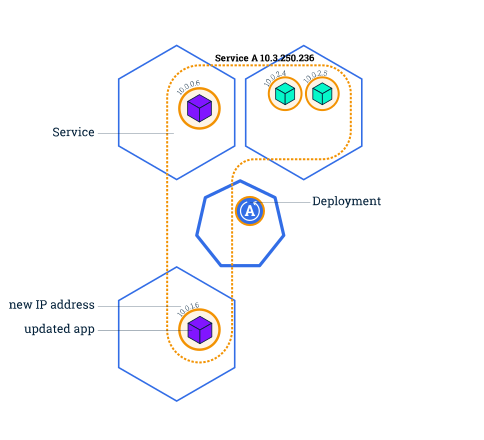
kubectl get pods
kubectl describe pods

kubectl set image deployments/kubernetes-bootcamp kubernetes-bootcamp=docker.io/jocatalin/kubernetes-bootcamp:v2
kubectl get pods
kubectl describe services/kubernetes-bootcamp
export NODE_PORT="$(kubectl get services/kubernetes-bootcamp -o go-template='{{(index .spec.ports 0).nodePort}}')"
echo "NODE_PORT=$NODE_PORT"

curl http://\((docker inspect -f '{{range .NetworkSettings.Networks}}{{.IPAddress}}{{end}}' kind-control-plane):\)NODE_PORT

kubectl rollout status deployments/kubernetes-bootcamp
kubectl describe pods
Rollback update:
kubectl set image deployments/kubernetes-bootcamp kubernetes-bootcamp=gcr.io/google-samples/kubernetes-bootcamp:v10
kubectl get deployments
kubectl get pods
kubectl describe pods
kubectl rollout undo deployments/kubernetes-bootcamp
kubectl get pods
kubectl describe pods
Clean up:
kubectl delete deployments/kubernetes-bootcamp services/kubernetes-bootcamp